


Help
Device guides
Alcatel
1b 2022

Alcatel 1b 2022

f-98ecd4aa-701f-495b-82c9-9d6efbb7e6f2
f-c62c06df-4281-423c-be3e-ac0f9dcc6199
f-cfe26b85-6774-4284-9057-70e0c40817c5
f-9bbf101e-cbd6-4576-b843-59b45d40cc83
f-96da1fc5-829f-42cf-87cc-0032686fb708
f-45eebbec-d385-4d24-85d1-2db5514c68d1
  • Device home
  • Getting started
  • Basic functions
  • Calls, contacts, messaging
  • Connectivity
  • Specifications
  • Device home
  • Getting started
  • Basic functions
  • Calls, contacts, messaging
  • Connectivity
  • Specifications

It's not possible to receive voice calls

Solution 3 of 3: Divert of all calls is turned on

If you no longer wish to divert your calls, you need to cancel the diverts.
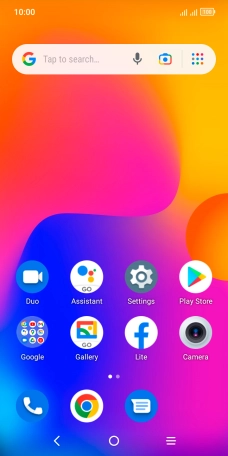
Press the phone icon.
Step 1 of 9

Press the phone icon.

Press the menu icon.
Step 2 of 9

Press the menu icon.

Press Settings.
Press Settings.
Step 3 of 9

Press Settings.

Press Calling accounts.
Step 4 of 9

Press Calling accounts.

Press the required SIM.
Step 5 of 9

Press the required SIM.

Press Call forwarding.
Step 6 of 9

Press Call forwarding.

Press the required divert type.
Step 7 of 9

Press the required divert type.

Press DISABLE.
Press DISABLE.
Step 8 of 9

Press DISABLE.

Press the Home key to return to the home screen.
Step 9 of 9

Press the Home key to return to the home screen.


Did this solve your problem?

Yes No

Get information on...

Or choose...

Show more