


Help
Device guides
Google
Pixel 4 XL

Google Pixel 4 XL

f-126d52d4-1dd5-412e-901e-44106fc9bac9
f-32c7287f-28ac-40a2-9e15-7b85e9a20737
f-2c51eb6b-149f-44f3-b3bd-2f00a6a975e1
f-4472ddc8-6f1a-40c6-8ad0-68b32e4a60ea
f-bde3279d-f4af-43d8-94e0-77d9052f9681
f-ef77e600-6459-42ce-9215-c9010d859ada
  • Device home
  • Getting started
  • Basic functions
  • Calls, contacts, messaging
  • Connectivity
  • Specifications
  • Device home
  • Getting started
  • Basic functions
  • Calls, contacts, messaging
  • Connectivity
  • Specifications

It's not possible to make voice calls

Solution 10 of 10: The selected network is out of range

You can set your phone to select a network automatically or you can select a network manually. If you select a network manually, your phone will lose network connection when the selected network is out of reach.
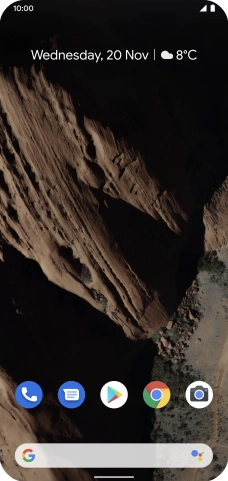
Slide two fingers downwards starting from the top of the screen.
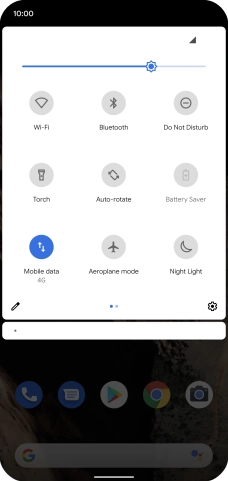
Step 1 of 9

Slide two fingers downwards starting from the top of the screen.

Press the settings icon.
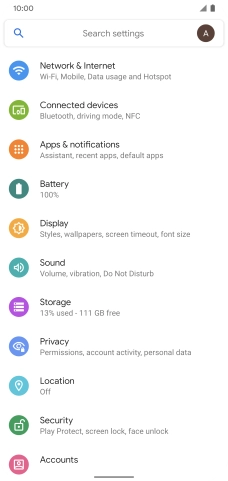
Step 2 of 9

Press the settings icon.

Press Network & Internet.
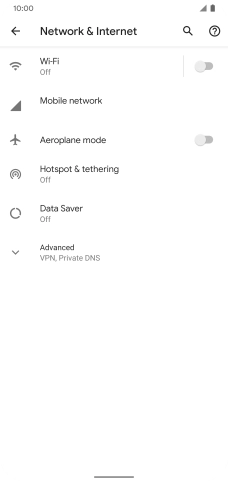
Step 3 of 9

Press Network & Internet.

Press Mobile network.
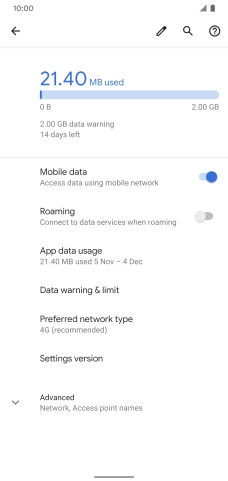
Step 4 of 9

Press Mobile network.

Press Advanced.
Press Advanced.
Step 5 of 9

Press Advanced.

Press the indicator next to
Step 6 of 9

Press the indicator next to "Automatically select network" to turn on the function.
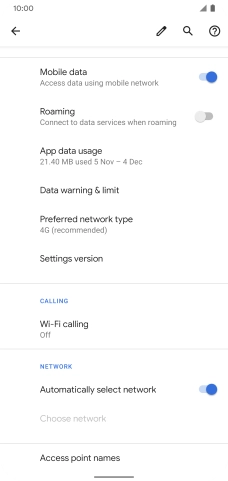
Press the indicator next to
Step 7 of 9

Press the indicator next to "Automatically select network" to turn off the function and wait while your phone searches for networks.

Press the required network.
Step 8 of 9

Press the required network.

Slide your finger upwards starting from the bottom of the screen to return to the home screen.
Step 9 of 9

Slide your finger upwards starting from the bottom of the screen to return to the home screen.


Did this solve your problem?

Yes No

Get information on...

Or choose...

Show more