Help
Device guides
Google
Pixel Watch

Google Pixel Watch

f-fd863b6a-1af8-43ad-b1ee-27f8dedff1be
f-8f6a0610-298e-44d7-918d-5593849dd1bf
f-d07cf61a-4583-4259-ab95-c337909b0d77
f-10ae5d2c-a8ff-4001-b79f-f4fe3054dc7d
f-291543ae-dd7d-4ba4-9b54-dfe106299751
  • Device home
  • Getting started
  • Basic functions
  • Calls, contacts, messaging
  • Connectivity
  • Specifications
  • Device home
  • Getting started
  • Basic functions
  • Calls, contacts, messaging
  • Connectivity
  • Specifications

I can't charge my smartwatch

Solution 3 of 6: The charger isn't correctly connected to your smartwatch

You should charge the smartwatch battery regularly to ensure that your smartwatch is always ready for use.

Connect the charger to a wall socket.
Step 1 of 3

Connect the charger to a wall socket.

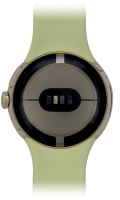
Place the back of your smartwatch on the magnetic charger allowing it to click into place.
Step 2 of 3

Place the back of your smartwatch on the magnetic charger allowing it to click into place.

When the battery charging icon is displayed, charging is in progress.
Step 3 of 3

When the battery charging icon is displayed, charging is in progress.


Did this solve your problem?

Yes No

Get information on...

Or choose...

Show more