





Help
Device guides
Huawei
Mate 20 X 5G

Huawei Mate 20 X 5G

f-47b9d78c-03c0-4230-bce5-bfe669971cab
f-aeb1f5b9-99d7-4f64-85e0-d31948fa551b
f-adc799d6-d29e-48c9-a4fa-9a17725a1b80
f-845bb7c9-ba8e-42d5-9135-51d41084a18b
f-bd7c1758-4255-4ee3-8b53-a87f6ba5ce5a
f-798a5d82-b2cc-4814-a964-1a9d1c62e23d
  • Device home
  • Getting started
  • Basic functions
  • Calls, contacts, messaging
  • Connectivity
  • Specifications
  • Device home
  • Getting started
  • Basic functions
  • Calls, contacts, messaging
  • Connectivity
  • Specifications

My phone's battery life is short

Solution 11 of 15: Low Power Mode has been turned off

Some functions on your phone use a lot of power and therefore significantly reduce the battery life. You can reduce the power consumption by turning on low power mode.
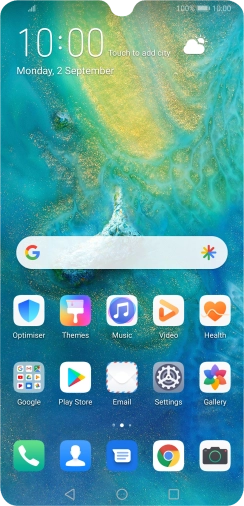
Press Settings.
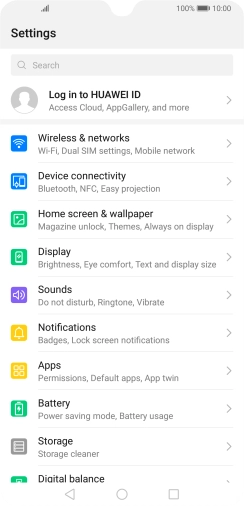
Press Settings.
Step 1 of 4

Press Settings.

Press Battery.
Press Battery.
Step 2 of 4

Press Battery.

Press the indicator next to the required setting to turn on the function.
Step 3 of 4

Press the indicator next to the required setting to turn on the function.

Press the Home key to return to the home screen.
Step 4 of 4

Press the Home key to return to the home screen.


Did this solve your problem?

Yes No

Get information on...

Or choose...

Show more