



Help
Device guides
Huawei
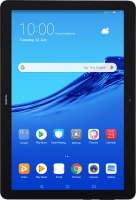
MediaPad T5

Huawei MediaPad T5

f-afda6190-6e00-4510-84ce-d38fc4f41e8d
f-3438ef7b-27bc-4e44-96bd-56d59908b7b6
f-f75b1c00-4952-4822-8c08-f67bf3a3078c
f-e34983cb-533a-4055-8ba1-c1287cf1b373
f-b701f893-d954-400f-ae0d-2fe316630c41
f-a26c12a7-145d-4cc2-ae7e-7f3b55432530
  • Device home
  • Getting started
  • Basic functions
  • Calls, contacts, messaging
  • Connectivity
  • Specifications
  • Device home
  • Getting started
  • Basic functions
  • Calls, contacts, messaging
  • Connectivity
  • Specifications

My tablet's battery life is short

Solution 9 of 9: GPS is turned on

Your tablet can determine your geographical position using GPS (Global Positioning System). The information about your location can be used by a number of applications on your tablet such as navigation, the search function or weather forecast.
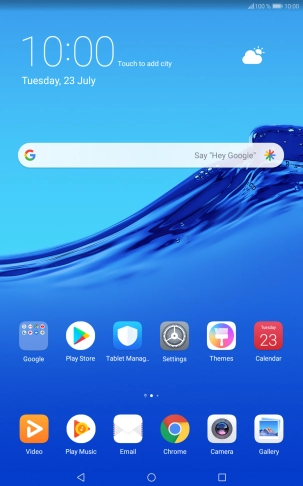
Press Settings.
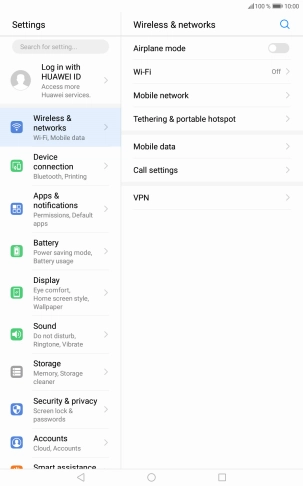
Press Settings.
Step 1 of 8

Press Settings.

Press Security & privacy.
Step 2 of 8

Press Security & privacy.

Press Location services.
Step 3 of 8

Press Location services.

Press the indicator next to
Step 4 of 8

Press the indicator next to "Access to my location" to turn the function on or off.

If you select Use GPS, Wi-Fi and mobile networks, your tablet can find your exact position using the GPS satellites, the mobile network and nearby Wi-Fi networks. Satellite-based GPS requires a clear view of the sky.
Step 5 of 8

If you select Use GPS, Wi-Fi and mobile networks, your tablet can find your exact position using the GPS satellites, the mobile network and nearby Wi-Fi networks. Satellite-based GPS requires a clear view of the sky.

If you select Use Wi-Fi and mobile networks, your tablet can find your approximate position using the mobile network and nearby Wi-Fi networks.
Step 6 of 8

If you select Use Wi-Fi and mobile networks, your tablet can find your approximate position using the mobile network and nearby Wi-Fi networks.

If you select Use GPS only, your tablet can find your exact position using the GPS satellites but it may take longer as there is no access to supplementary information from the mobile network or nearby Wi-Fi networks.
Step 7 of 8

If you select Use GPS only, your tablet can find your exact position using the GPS satellites but it may take longer as there is no access to supplementary information from the mobile network or nearby Wi-Fi networks.

Press the Home key to return to the home screen.
Step 8 of 8

Press the Home key to return to the home screen.


Did this solve your problem?

Yes No

Get information on...

Or choose...

Show more