





Help
Device guides
Huawei
nova 5T

Huawei nova 5T

f-bc623a22-217b-4237-a785-f1d6e3f05e94
f-4178a1d9-107b-479b-bf25-432ecaed1dd5
f-ae939eee-c4b2-4120-b342-75ec9faf3e6b
f-5cf2818a-bd98-45d5-a13e-df362f7dafe8
f-acc38f37-943c-4480-9cba-5090dabc5435
f-961737bf-b2f0-4d00-8d30-6c7340b9dddd
  • Device home
  • Getting started
  • Basic functions
  • Calls, contacts, messaging
  • Connectivity
  • Specifications
  • Device home
  • Getting started
  • Basic functions
  • Calls, contacts, messaging
  • Connectivity
  • Specifications

Selecting network mode

There may be different network modes available depending on where you are. The network mode influences the data speeds your phone can achieve.
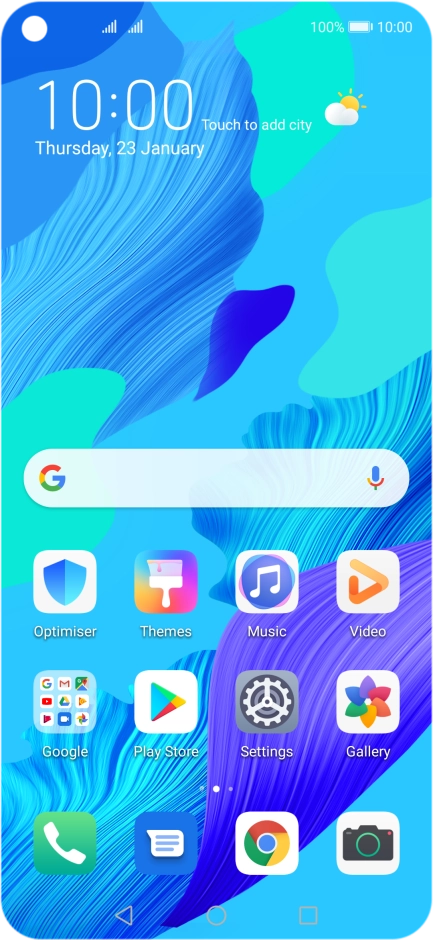
Press Settings.
Press Settings.
Step 1 of 6

Press Settings.

Press Mobile network.
Step 2 of 6

Press Mobile network.

Press Mobile data.
Press Mobile data.
Step 3 of 6

Press Mobile data.

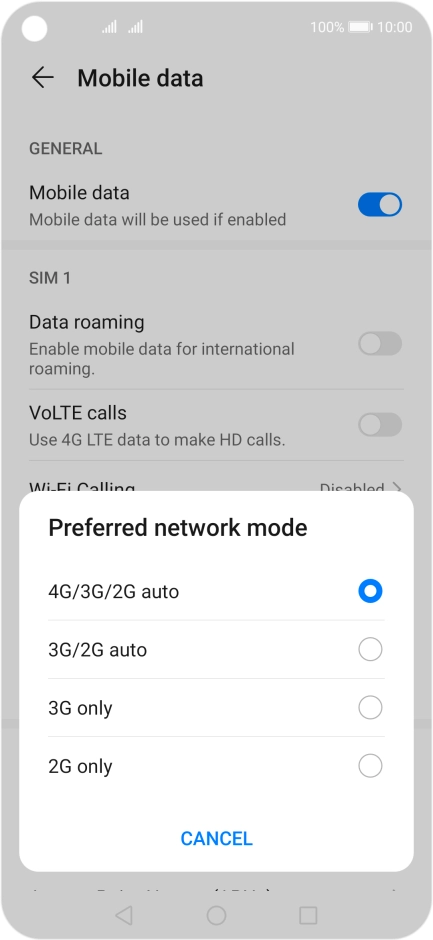
Press Preferred network mode below the required SIM.
Step 4 of 6

Press Preferred network mode below the required SIM.

Press the required network mode.
Step 5 of 6

Press the required network mode.

There may be different network modes available depending on where you are. If you set your phone to the fastest network mode, it will always find the network with the highest data speed and best signal.
Press the Home key to return to the home screen.
Step 6 of 6

Press the Home key to return to the home screen.

Get information on...

Or choose...

Show more