




Help
Device guides
Huawei
P30 lite

Huawei P30 lite

f-a648f297-4545-402e-9e65-2b064453f507
f-bb59445c-d712-4313-90e0-dd01cf95b0c9
f-23c7a06f-ac0c-4878-a3bb-efa4ad144408
f-eb5e20f9-4a39-4b88-b917-3ae9c86be9cd
f-e290a4b3-0987-455d-a343-a561cbb6d640
f-690366ca-8c1c-40b9-a457-b32747b729c6
  • Device home
  • Getting started
  • Basic functions
  • Calls, contacts, messaging
  • Connectivity
  • Specifications
  • Device home
  • Getting started
  • Basic functions
  • Calls, contacts, messaging
  • Connectivity
  • Specifications

Saving voicemail number

You can save your voicemail number making it easy to call and listen to your voice messages.
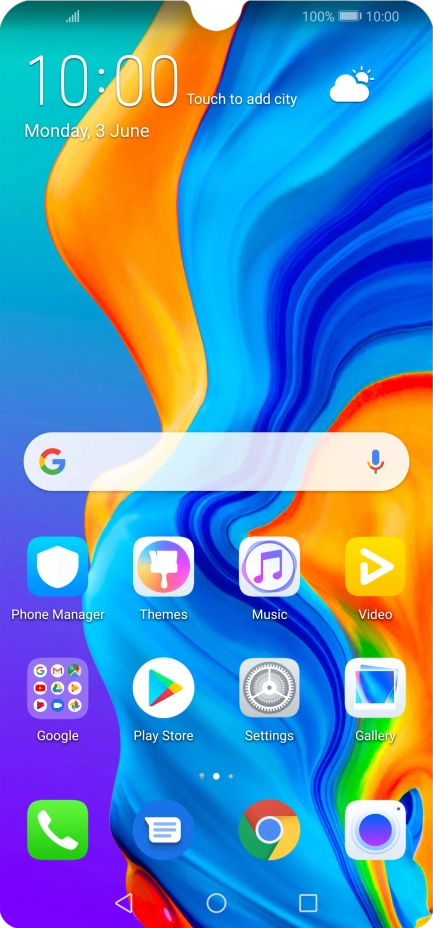
Press the phone icon.
Step 1 of 8

Press the phone icon.

Press the menu icon.
Step 2 of 8

Press the menu icon.

Press Settings.
Press Settings.
Step 3 of 8

Press Settings.

Press More.
Press More.
Step 4 of 8

Press More.

Press Voicemail.
Press Voicemail.
Step 5 of 8

Press Voicemail.

Press Voicemail number.
Step 6 of 8

Press Voicemail number.

Key in +447953222222 and press OK.
+447953222222
Key in +447953222222 and press OK.
+447953222222
Step 7 of 8

Key in +447953222222 and press OK.

Press the Home key to return to the home screen.
Step 8 of 8

Press the Home key to return to the home screen.

Get information on...

Or choose...

Show more