Help
Device guides
Huawei
P30 lite New Edition

Huawei P30 lite New Edition


f-c99e242c-702a-40f1-9b5f-d38084b40266
f-5651e181-1124-4072-a855-df82e9eced61
f-6b3ea370-78c1-450f-9f59-e51cf111a771
f-cd4aca61-0b34-4cf2-a32d-a67a828b93ac
f-766244e0-8801-475d-a04e-3df3df914910
f-ba96b406-6f9d-4b4e-9623-1a9a95e58394
  • Device home
  • Getting started
  • Basic functions
  • Calls, contacts, messaging
  • Connectivity
  • Specifications
  • Device home
  • Getting started
  • Basic functions
  • Calls, contacts, messaging
  • Connectivity
  • Specifications

Saving voicemail number

You can save your voicemail number making it easy to call and listen to your voice messages.

Press the phone icon.
Step 1 of 8

Press the phone icon.

Press the menu icon.
Step 2 of 8

Press the menu icon.

Press Settings.
Press Settings.
Step 3 of 8

Press Settings.

Press More.
Press More.
Step 4 of 8

Press More.

Press Voicemail.
Press Voicemail.
Step 5 of 8

Press Voicemail.

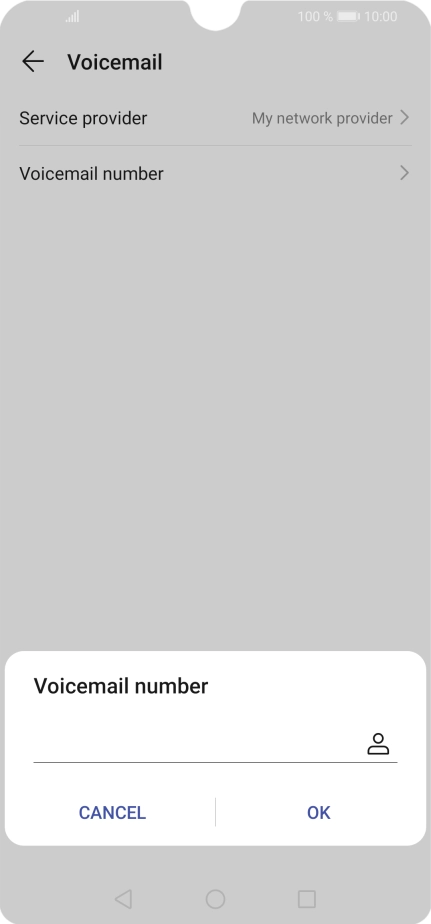
Press Voicemail number.
Step 6 of 8

Press Voicemail number.

Key in +447953222222 and press OK.
+447953222222
Key in +447953222222 and press OK.
+447953222222
Step 7 of 8

Key in +447953222222 and press OK.

Press the Home key to return to the home screen.
Step 8 of 8

Press the Home key to return to the home screen.

Get information on...

Or choose...

Show more