



Help
Device guides
Huawei
P40 lite 5G

Huawei P40 lite 5G

f-2a1cacb3-8bdc-4faf-ae12-ecefc097d38b
f-a674966d-ce0f-4a63-8cee-78138fbfe860
f-daea9c61-7a6b-4dfe-a7ae-2c9df301d429
f-26ebb6c4-75a0-4a28-b17b-8fdb06f173f5
f-3264d04f-477f-461d-b3cb-ad992c58e37d
f-15894f03-5d79-4c87-aa7f-f7d16d4eb8ab
  • Device home
  • Getting started
  • Basic functions
  • Calls, contacts, messaging
  • Connectivity
  • Specifications
  • Device home
  • Getting started
  • Basic functions
  • Calls, contacts, messaging
  • Connectivity
  • Specifications

It's not possible to use Wi-Fi calling

Solution 3 of 4: Your phone's software hasn't been updated to the latest version

It's recommended that you update your phone with the newest software, as the manufacturer continuously corrects errors. It's a good idea to back up the phone memory first. Before you can update the phone software, you need to set up your phone for internet.
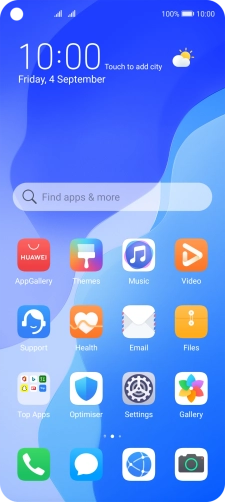
Press Settings.
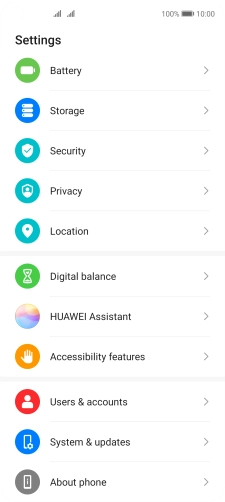
Press Settings.
Step 1 of 3

Press Settings.

Press System & updates.
Step 2 of 3

Press System & updates.

Press Software update. If a new software version is available, it's displayed. Follow the instructions on the screen to update the phone software.
Step 3 of 3

Press Software update. If a new software version is available, it's displayed. Follow the instructions on the screen to update the phone software.


Did this solve your problem?

Yes No

Get information on...

Or choose...

Show more