



Help
Device guides
Huawei
P40 Pro

Huawei P40 Pro

f-68820e22-cce0-4e67-aef0-bb5aab9779da
f-06c071a9-fd11-4bf7-b744-39fc44a814c4
f-b91a16d7-edb4-4fce-bf25-c05d59517602
f-afd6e8b2-6543-480b-a0b7-316b6591b461
f-2ac96897-81fc-4309-a202-a6ea4ccfad30
f-01f5ba1c-9be7-4db8-8afe-0373d0e10ad8
  • Device home
  • Getting started
  • Basic functions
  • Calls, contacts, messaging
  • Connectivity
  • Specifications
  • Device home
  • Getting started
  • Basic functions
  • Calls, contacts, messaging
  • Connectivity
  • Specifications

My phone uses a large amount of mobile data

Solution 3 of 4: Automatic mobile data usage is turned on

You can set your phone to use mobile data automatically when the connection to the Wi-Fi network is weak. To turn automatic use of mobile data on or off, you need to turn on mobile data.
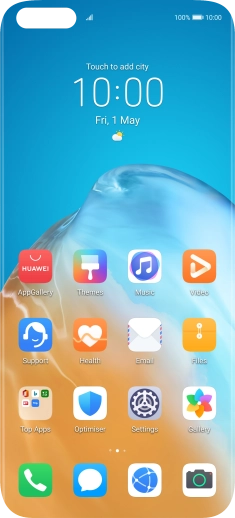
Press Settings.
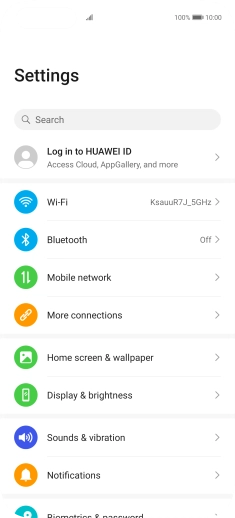
Press Settings.
Step 1 of 6

Press Settings.

Press Wi-Fi.
Press Wi-Fi.
Step 2 of 6

Press Wi-Fi.

Press the indicator next to
Step 3 of 6

Press the indicator next to "Wi-Fi" to turn on the function.

Press More settings.
Step 4 of 6

Press More settings.

Press the indicator next to
Step 5 of 6

Press the indicator next to "Wi-Fi+" to turn the function on or off.

Slide your finger upwards starting from the bottom of the screen to return to the home screen.
Step 6 of 6

Slide your finger upwards starting from the bottom of the screen to return to the home screen.


Did this solve your problem?

Yes No

Get information on...

Or choose...

Show more