



Help
Device guides
OPPO
Find N2 Flip

OPPO Find N2 Flip

f-e5f4aed4-3970-4f30-9281-8cae2cd1b4e7
f-a18ceff3-03c2-4d79-a0bc-f16a4b6d5517
f-73648a17-925f-403e-a222-b1e3ab94a47b
f-e2ee1346-cd1b-43b6-bfa9-a74f0c5c43d0
f-3c5e44f7-9dd8-4829-8104-df2f8b8099b2
f-39e287d0-de15-4a70-97c1-4a9052b3c204
  • Device home
  • Getting started
  • Basic functions
  • Calls, contacts, messaging
  • Connectivity
  • Specifications
  • Device home
  • Getting started
  • Basic functions
  • Calls, contacts, messaging
  • Connectivity
  • Specifications

It's not possible to make voice calls

Solution 4 of 11: Barring of outgoing calls is turned on

You can block certain types of calls such as incoming calls when you're abroad.
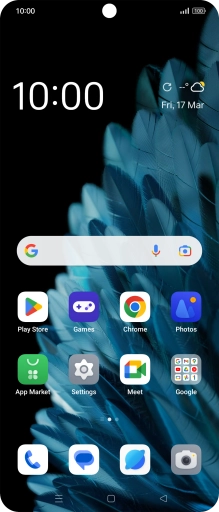
Press the call icon.
Step 1 of 9

Press the call icon.

Press the menu icon.
Step 2 of 9

Press the menu icon.

Press Settings.
Press Settings.
Step 3 of 9

Press Settings.

Press Calling accounts.
Step 4 of 9

Press Calling accounts.

Press Operator-related settings.
Step 5 of 9

Press Operator-related settings.

Press Call barring.
Press Call barring.
Step 6 of 9

Press Call barring.

Press the required barring type.
Step 7 of 9

Press the required barring type.

Key in your barring password.
Step 8 of 9

Key in your barring password.

Press the Home key to return to the home screen.
Step 9 of 9

Press the Home key to return to the home screen.


Did this solve your problem?

Yes No

Get information on...

Or choose...

Show more