





Help
Device guides
OPPO
Find X3 Neo

OPPO Find X3 Neo

f-705b3c89-f8b1-4b6b-9d24-ccd877c026a4
f-b34553d4-9316-4293-8b78-51d665374675
f-965502a6-03b2-4297-b7f4-8d5903a54db1
f-d1b3b821-45dc-42bc-971f-8e57348cc6ff
f-73c4675a-badf-481c-8747-170fb31c139e
f-eb44f1bc-f5f7-4e3f-a650-70003b40ed90
  • Device home
  • Getting started
  • Basic functions
  • Calls, contacts, messaging
  • Connectivity
  • Specifications
  • Device home
  • Getting started
  • Basic functions
  • Calls, contacts, messaging
  • Connectivity
  • Specifications

It's not possible to make voice calls

Solution 2 of 11: The selected network mode isn't available

There may be different network modes available depending on where you are. The network mode influences the data speeds your phone can achieve.
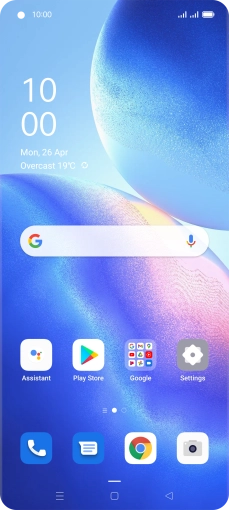
Slide two fingers downwards starting from the top of the screen.
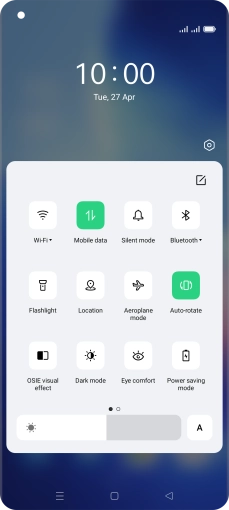
Step 1 of 7

Slide two fingers downwards starting from the top of the screen.

Press the settings icon.
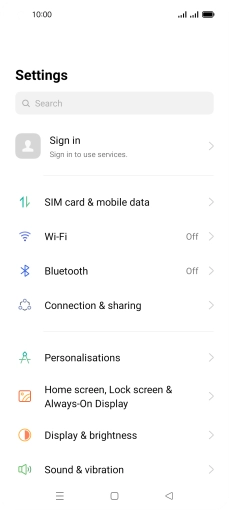
Step 2 of 7

Press the settings icon.

Press SIM card & mobile data.
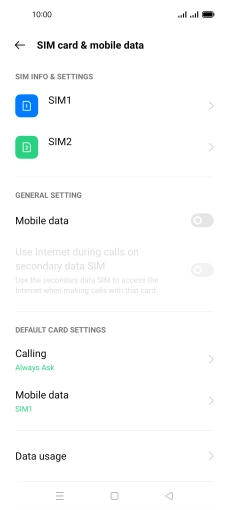
Step 3 of 7

Press SIM card & mobile data.

Press the required SIM.
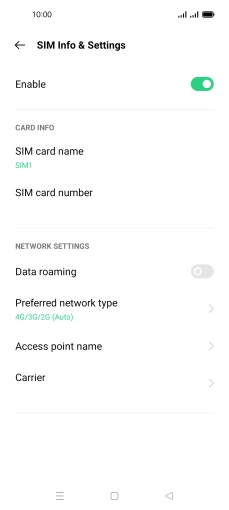
Step 4 of 7

Press the required SIM.

Press Preferred network type.
Step 5 of 7

Press Preferred network type.

Press the required network mode.
Step 6 of 7

Press the required network mode.

Press the Home key to return to the home screen.
Step 7 of 7

Press the Home key to return to the home screen.


Did this solve your problem?

Yes No

Get information on...

Or choose...

Show more