


Help
Device guides
OPPO
Reno 5G

OPPO Reno 5G

f-abc28611-1b6a-415d-89ed-56e66252fab7
f-05f5b698-add6-42ad-ad10-2e916f61a144
f-6888a5d3-cece-4cb2-96fb-13de97377878
f-cbd51597-d85c-4da6-b9b9-5a6f96bb38be
f-38c6e5ed-2429-4c5e-aa78-95b435ef8204
f-d4b64a53-afe8-4b1c-b571-411f269884a8
  • Device home
  • Getting started
  • Basic functions
  • Calls, contacts, messaging
  • Connectivity
  • Specifications
  • Device home
  • Getting started
  • Basic functions
  • Calls, contacts, messaging
  • Connectivity
  • Specifications

It's not possible to receive voice calls

Solution 3 of 3: Divert of all calls is turned on

If you no longer wish to divert your calls, you need to cancel the diverts.
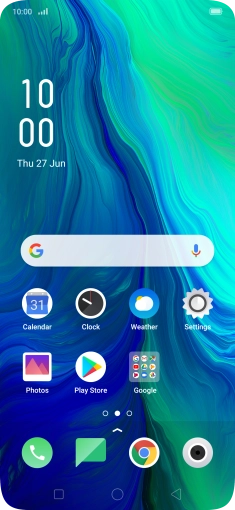
Press the phone icon.
Step 1 of 7

Press the phone icon.

Press the settings icon.
Step 2 of 7

Press the settings icon.

Press Carrier Call Settings.
Step 3 of 7

Press Carrier Call Settings.

Press Call Forwarding.
Step 4 of 7

Press Call Forwarding.

Press the required divert type.
Step 5 of 7

Press the required divert type.

Press Off.
Press Off.
Step 6 of 7

Press Off.

Press the Home key to return to the home screen.
Step 7 of 7

Press the Home key to return to the home screen.


Did this solve your problem?

Yes No

Get information on...

Or choose...

Show more