







Help
Device guides
OPPO
Reno13 FS 5G

OPPO Reno13 FS 5G

f-c474ecc4-daeb-4393-bf41-8f440217504d
f-f8e94149-42d1-4a52-9042-132aa6f41a20
f-cfb358fe-805e-47b2-b2a8-8d5427603f16
f-87e30f88-6d69-4205-9a2a-59d49b9b5777
f-2c9f3617-cd22-4171-9534-34c7c5e6fd4d
f-274bbd3d-5b30-464f-a196-a420f545bea4
f-6683bbbd-37d7-4fa8-ad16-0e5db233ebaf
f-40e7f626-a2ee-4b47-94d6-ccfad52868a5
  • Device home
  • Getting started
  • Basic functions
  • Calls, contacts, messaging
  • Connectivity
  • Specifications
  • Device home
  • Getting started
  • Basic functions
  • Calls, contacts, messaging
  • Connectivity
  • Specifications

It's not possible to check my voicemail

Solution 2 of 6: The voicemail number isn't saved on your phone

You can save your voicemail number making it easy to call and listen to your voice messages.
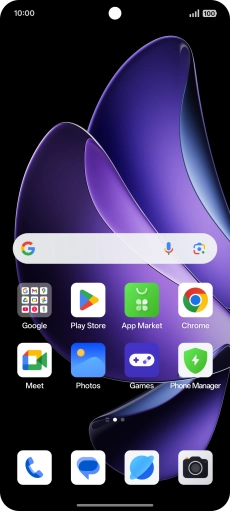
Press the call icon.
Step 1 of 8

Press the call icon.

Press the menu icon.
Step 2 of 8

Press the menu icon.

Press Settings.
Press Settings.
Step 3 of 8

Press Settings.

Press Voicemail.
Press Voicemail.
Step 4 of 8

Press Voicemail.

Press Advanced Settings.
Step 5 of 8

Press Advanced Settings.

Press Number.
Press Number.
Step 6 of 8

Press Number.

Key in +447953222222 and press OK.
+447953222222
Key in +447953222222 and press OK.
+447953222222
Step 7 of 8

Key in +447953222222 and press OK.

Slide your finger upwards starting from the bottom of the screen to return to the home screen.
Step 8 of 8

Slide your finger upwards starting from the bottom of the screen to return to the home screen.


Did this solve your problem?

Yes No

Get information on...

Or choose...

Show more