Help
Device guides
Samsung
Galaxy A53 5G

Samsung Galaxy A53 5G
f-aa99f168-13a3-4c8d-9d4d-8fca574147db
f-ad92b3c8-2c9c-4edc-8650-e24efb7ec2b6
f-f4245a5d-bb42-466f-b47d-080a5969a3bf
f-b5c4bc34-ead9-4975-835a-1b48b34086d1
f-712c9c1e-a8f4-4dfd-94b9-dc67fddc676a
f-2ab82977-33e4-4e39-8be2-bbb13982f000
  • Device home
  • Getting started
  • Basic functions
  • Calls, contacts, messaging
  • Connectivity
  • Specifications
  • Device home
  • Getting started
  • Basic functions
  • Calls, contacts, messaging
  • Connectivity
  • Specifications

It's not possible to use Wi-Fi calling

Solution 4 of 4: Wi-Fi calling is turned off

When Wi-Fi calling is turned on, you can make and answer calls using a Wi-Fi network when you're in an area with little or no network coverage. To turn on Wi-Fi calling, you need to establish a connection to a Wi-Fi network, select 4G (LTE) as network mode and follow the steps below. You can also visit the EE web page for more information about Wi-Fi calling.
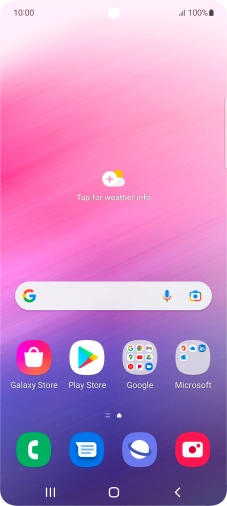
Slide two fingers downwards starting from the top of the screen.
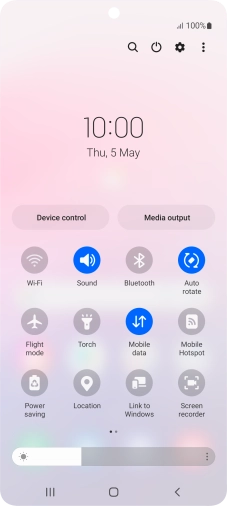
Step 1 of 5

Slide two fingers downwards starting from the top of the screen.

Press the settings icon.
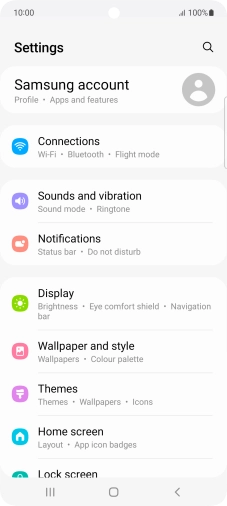
Step 2 of 5

Press the settings icon.

Press Connections.
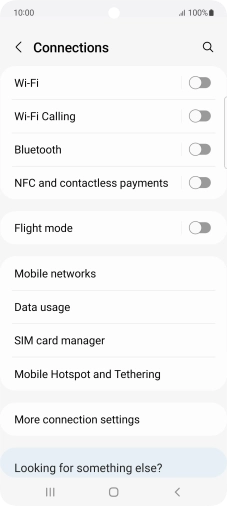
Press Connections.
Step 3 of 5

Press Connections.

Press the indicator next to
Step 4 of 5

Press the indicator next to "Wi-Fi Calling" to turn the function on or off.

Press the Home key to return to the home screen.
Step 5 of 5

Press the Home key to return to the home screen.


Did this solve your problem?

Yes No

Get information on...

Or choose...

Show more