


Help
Device guides
Samsung
Galaxy A55

Samsung Galaxy A55

f-4990cbc5-dc2f-4ffc-9015-a9296cf8a4e8
f-fe532214-fa39-4f5b-ab7b-c7ade27136b2
f-292f7946-617b-4f81-8590-e360f9c30277
f-069ccbec-fdf6-42d5-adfd-c1e1b2fd9635
f-5570e54d-c5f6-43c3-a354-ab0c5af73369
f-319e84f9-01d6-42dc-a3cd-1a5cd5d831d8
f-bfbb80df-0a7d-48ec-8fbc-b7890d5bdc19
f-7bd9e5b5-1a5d-49c7-8d0f-99104f7c5d61
  • Device home
  • Getting started
  • Basic functions
  • Calls, contacts, messaging
  • Connectivity
  • Specifications
  • Device home
  • Getting started
  • Basic functions
  • Calls, contacts, messaging
  • Connectivity
  • Specifications

It's not possible to receive voice calls

Solution 2 of 4: Divert of all calls is turned on

If you no longer wish to divert your calls, you need to cancel the diverts.
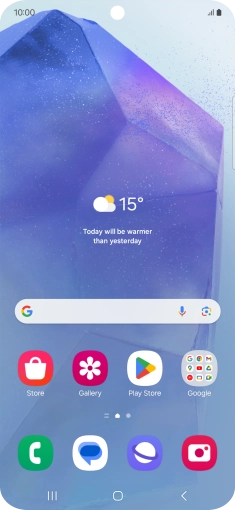
Press the call icon.
Step 1 of 8

Press the call icon.

Press the menu icon.
Step 2 of 8

Press the menu icon.

Press Settings.
Press Settings.
Step 3 of 8

Press Settings.

Press Supplementary services.
Step 4 of 8

Press Supplementary services.

Press Call forwarding.
Step 5 of 8

Press Call forwarding.

Press the required divert type.
Step 6 of 8

Press the required divert type.

Press Disable.
Press Disable.
Step 7 of 8

Press Disable.

Press the Home key to return to the home screen.
Step 8 of 8

Press the Home key to return to the home screen.


Did this solve your problem?

Yes No

Get information on...

Or choose...

Show more