






Help
Device guides
Samsung
Galaxy S24

Samsung Galaxy S24

f-da8e23dd-b1d7-469d-bf6d-f26a70457774
f-6afe3d66-17f4-4526-bc82-6fca20ec413f
f-ea456253-a687-4a97-8c10-1daeb748f773
f-996b6108-8554-4316-9ec7-1fba5d67b879
f-004962d2-7dd8-4af4-bb3e-443c066354c8
f-5b5759c4-3426-4ef2-8c11-3adba36f3718
f-29fd29fc-3da6-49d8-a498-59a7ef2d1c78
f-a4f7831c-b843-4459-a39c-8a055647e805
  • Device home
  • Getting started
  • Basic functions
  • Calls, contacts, messaging
  • Connectivity
  • Specifications
  • Device home
  • Getting started
  • Basic functions
  • Calls, contacts, messaging
  • Connectivity
  • Specifications

Saving voicemail number

You can save your voicemail number making it easy to call and listen to your voice messages.
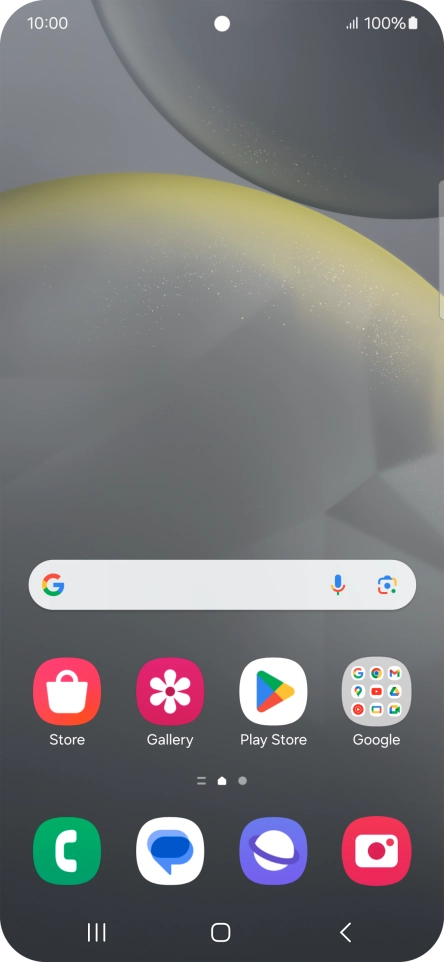
Press the call icon.
Step 1 of 7

Press the call icon.

Press the menu icon.
Step 2 of 7

Press the menu icon.

Press Settings.
Press Settings.
Step 3 of 7

Press Settings.

Press Voicemail.
Press Voicemail.
Step 4 of 7

Press Voicemail.

Press Voicemail number.
Step 5 of 7

Press Voicemail number.

Key in +447953222222 and press OK.
+447953222222
Key in +447953222222 and press OK.
+447953222222
Step 6 of 7

Key in +447953222222 and press OK.

Press the Home key to return to the home screen.
Step 7 of 7

Press the Home key to return to the home screen.

Get information on...

Or choose...

Show more