Help
Device guides
Samsung
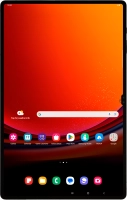
Galaxy Tab S9 Ultra

Samsung Galaxy Tab S9 Ultra
f-95da0bc4-0e61-492d-a0f3-d4b64dad9ce7
f-8cf27981-8760-4071-b3db-00d1fbb04e0c
f-045bf405-afeb-46ed-9ffb-b0050a640079
f-aaf2ed0b-8c3a-4262-952c-af8045d06c3b
f-0c8aebda-7728-4054-ad23-e275fcdd9906
f-da990b20-41ef-41ab-8076-5902fd4b48b8
  • Device home
  • Getting started
  • Basic functions
  • Calls, contacts, messaging
  • Connectivity
  • Specifications
  • Device home
  • Getting started
  • Basic functions
  • Calls, contacts, messaging
  • Connectivity
  • Specifications

Troubleshooting

  • It's not possible to receive messages on my voicemail
  • It's not possible to check my voicemail
  • It's not possible to send and receive text messages
  • It's not possible to send and receive picture messages
  • It's not possible to send and receive email messages
  • It's not possible to make voice calls
  • It's not possible to receive voice calls

Call settings

  • Turning call waiting on or off
  • Turning your own caller identification on or off
  • Turning Wi-Fi calling on or off

Contacts

  • Saving new contact to your Google account
  • Copying contacts between your SIM and your Google account

Voicemail

  • Saving voicemail number
  • Diverting calls to voicemail
  • Cancelling all diverts

Call restrictions

  • Turning call barring on or off
  • Turning fixed dialling on or off

Text messaging

  • Setting up your tablet for text messaging

Picture messaging

  • Setting up your tablet for picture messaging

Email messaging

  • Setting up your tablet for IMAP email

Get information on...

Or choose...

Show more