Help
Device guides
Samsung
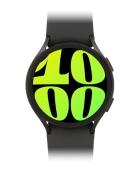
Galaxy Watch 6

Samsung Galaxy Watch 6
f-bcc348b2-a3f3-441c-a54c-103d76dad382
f-110247e6-1df7-4cca-9dc1-89d11a37b80f
f-c9015b48-725b-4e13-bf8e-59782cd35b4c
f-b7efd754-1bd4-474d-b173-2f59b09e2b9b
f-b30eba3f-97d5-4469-95de-415519eaac38
  • Device home
  • Getting started
  • Basic functions
  • Calls, contacts, messaging
  • Connectivity
  • Specifications
  • Device home
  • Getting started
  • Basic functions
  • Calls, contacts, messaging
  • Connectivity
  • Specifications

I can't play music

Solution 2 of 5: The headset isn't working

Bluetooth is a wireless connection which is used to connect to your phone. You can also use Bluetooth to establish a connection to e.g. a wireless headset.

Slide your finger upwards starting from the bottom of the screen.
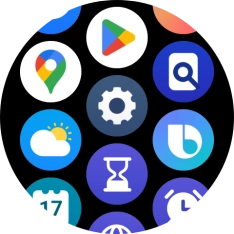
Step 1 of 7

Slide your finger upwards starting from the bottom of the screen.

Press the settings icon.
Step 2 of 7

Press the settings icon.

Press Connections.
Press Connections.
Step 3 of 7

Press Connections.

Press Bluetooth.
Press Bluetooth.
Step 4 of 7

Press Bluetooth.

Press the indicator below
Step 5 of 7

Press the indicator below "Bluetooth" to turn on the function.

Press the required device.
Step 6 of 7

Press the required device.

Press the Home key to return to the home screen.
Step 7 of 7

Press the Home key to return to the home screen.


Did this solve your problem?

Yes No

Get information on...

Or choose...

Show more