Help
Device guides
Samsung
Galaxy Watch4

Samsung Galaxy Watch4
f-efb023ed-9a1f-4e4f-b34c-a90cc569253b
f-7a47821c-6128-4fb6-b753-5610a68e918e
f-9146d85c-3c23-4e9e-afcd-1d8852129803
f-99bad98b-3f1f-4423-81fb-13bc6ff79a94
f-0fef43f0-4942-43be-bc50-86bd832f5c65
  • Device home
  • Getting started
  • Basic functions
  • Calls, contacts, messaging
  • Connectivity
  • Specifications
  • Device home
  • Getting started
  • Basic functions
  • Calls, contacts, messaging
  • Connectivity
  • Specifications

Restarting your smartwatch

If your smartwatch is slow or freezes, it might help to restart it.

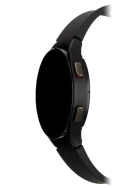
Press and hold the Home key until your smartwatch restarts.
Step 1 of 1

Press and hold the Home key until your smartwatch restarts.

Get information on...

Or choose...

Show more