


Help
Device guides
Apple
iPhone 13 mini

iPhone 13 mini

f-1f022b63-015d-4572-8f29-62b8ddcb7a36
f-f778a7d2-dc80-4688-a656-a07c842ff972
f-e051e883-7420-443b-ac67-a869a980061c
f-15b359ce-1502-4c8b-92dd-696ec234a2d5
f-37059c77-69a6-4b43-8ae1-a85b5f249aea
f-5d4f3f7f-c516-4926-8642-986530ee49ef
  • Device home
  • Getting started
  • Basic functions
  • Calls, contacts, messaging
  • Connectivity
  • Specifications
  • Device home
  • Getting started
  • Basic functions
  • Calls, contacts, messaging
  • Connectivity
  • Specifications

I can't receive voice messages on my voicemail

Solution 2 of 3: Incoming calls aren't diverted to your voicemail

To receive voice messages, you need to divert your calls to your voicemail.
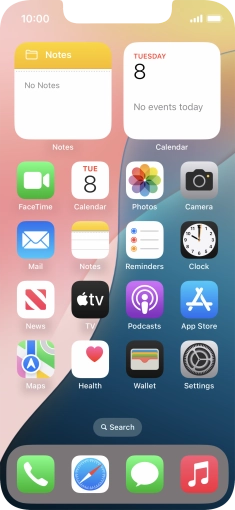
Press the phone icon.
Step 1 of 8

Press the phone icon.

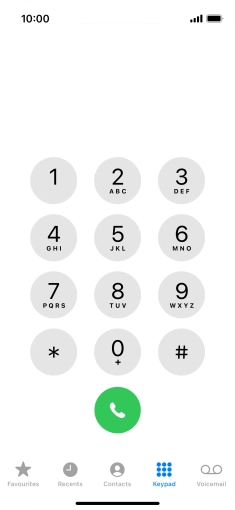
Press Keypad.
Press Keypad.
Step 2 of 8

Press Keypad.

Key in **21*222# and press the call icon.
**21*222#
Key in **21*222# and press the call icon.
**21*222#
Step 3 of 8

Key in **21*222# and press the call icon.

Key in **61*222*20# and press the call icon.
**61*222*20#
Key in **61*222*20# and press the call icon.
**61*222*20#
Step 4 of 8

Key in **61*222*20# and press the call icon.

Key in **62*222# and press the call icon.
**62*222#
Key in **62*222# and press the call icon.
**62*222#
Step 5 of 8

Key in **62*222# and press the call icon.

Key in **67*222# and press the call icon.
**67*222#
Key in **67*222# and press the call icon.
**67*222#
Step 6 of 8

Key in **67*222# and press the call icon.

Press Dismiss.
Press Dismiss.
Step 7 of 8

Press Dismiss.

Slide your finger upwards starting from the bottom of the screen to return to the home screen.
Step 8 of 8

Slide your finger upwards starting from the bottom of the screen to return to the home screen.


Did this solve your problem?

Yes No

Get information on...

Or choose...

Show more