EE TV Box Pro


Overview of the remote control keys
The list below shows you what the different keys on the set-top box remote control are used for.

On/Off is in the middle at the top of the remote control.
Press On/Off to turn your set-top box on or off.
The Source key, first row bottom left of On/Off.
Press the Source key to select the required source.
The Menu key, first row bottom right of On/Off.
Press the Menu key to select audio, subtitles and zoom functions.
The Home key, leftmost key on second row below the Source key.
Press the Home key to return to the home menu.
The Search key, second key in the middle of the second row.
Press the Search key to open the search menu.
The Guide key, rightmost key on the second row below the Menu key.
Press Guide to see the TV guide.
The Back key, third row below the Home key.
Press Back to exit the menu item and return to the previous menu item.
The Back key, third row below the Home key.
Press and hold Back to immediately exit an app.
The Information key, third row below the Guide key.
Press the Information key during programme playback to view information about the programme.
Arrow keys, round directional pad (Up/Down/Left/Right).
Press the Navigation keys to scroll though the menu items.
The OK key, in the centre of the directional pad.
Press OK to select a programme or menu item.

The Play/Pause key, in the middle of the row of three keys underneath the directional pad.
Press the Play/Pause key to start or pause playback of a programme.
The Rewind and Forward keys, to the left and right of the Play key underneath the directional keypad.
Press the Fast forward/rewind keys to fast forward or rewind a programme.
The Vol + and – keys are grouped together on the left of the group of keys below the Rewind / Play / Forward keys. On the upper part is the concave Vol + key. The Vol - key is in the lower part and recessed.
Press the upper or lower part of the Volume key to adjust the volume.
The P + and – keys are grouped together to the right of the group of keys below the Rewind / Play / Forward keys. On the upper part is the concave P + key. The P - key is in the lower part and recessed.
Press the upper or lower part of the "P" key to change TV channel.
The “R” Record key, to the right of the concave Vol + key.
Press the "R" key one or more times to start a single recording or a series recording.
The “R” Record key, to the right of the concave Vol + key.
Press the "R" key to delete a recording.
Below the R key is the Mute key.
Press the Mute key to turn the sound on or off.
Below the group of the Volume and P keys are the four coloured function keys. From left to right: red, green, yellow, blue.
The Function keys (red, green, yellow, blue) are assigned different contextual functions depending on the current menu item.
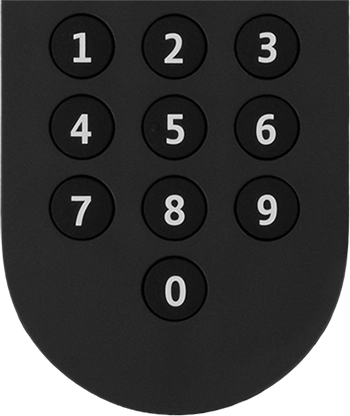
Below the coloured keys are the 10 keys numeric keypad. Key 1 on top left, key 0 middle bottom. Key 5 can be identified by its raised tactile dot.
Press the Numeric keys to change TV channel.